Use Chrome or Edge on desktop and connect the display via USB.
Which variant do I have? The two 2.8" boards look identical and the silkscreen doesn't name the panel controller. The USB port count is a hint, not a rule: 1 port (Micro-USB only) is usually ILI9341 and 2 ports (USB-C + Micro-USB) is usually ST7789 — but 2-port boards fitted with an ILI9341 do exist, so the count can be wrong. Guessing wrong costs nothing but a re-flash: the wrong build leaves the backlight on with a blank, garbled or wrong-coloured image, and it cannot damage the board. Start with the build matching your port count; if the picture is wrong or never appears, flash the other one — that is the answer, not a fault in your wiring or your MiSTer.
Capacitive or resistive? You usually can't tell from the board — both 3.5" variants use the same display and PCB, and the touch chips present don't reliably indicate the variant. It doesn't matter if you pick wrong: the picture is identical either way, and the only symptom of the wrong build is an unresponsive touchscreen — if touch doesn't work, just flash the other one. (Hint: capacitive reacts to a light finger touch; resistive needs a firm press or a stylus.)
The V2 board, with the CST3530 capacitive touch
controller; the V1, the non-touch ESP32-S3-LCD-2.8 and the -2.8B are
different boards. It has a single USB-C port: if the flasher cannot see
it, hold BOOT while plugging it in. The SD card content is
in SD_card_content/Waveshare28/. Marked beta because the touchscreen has not
been verified on hardware yet; the display itself works.
Port by Rick van Soest.
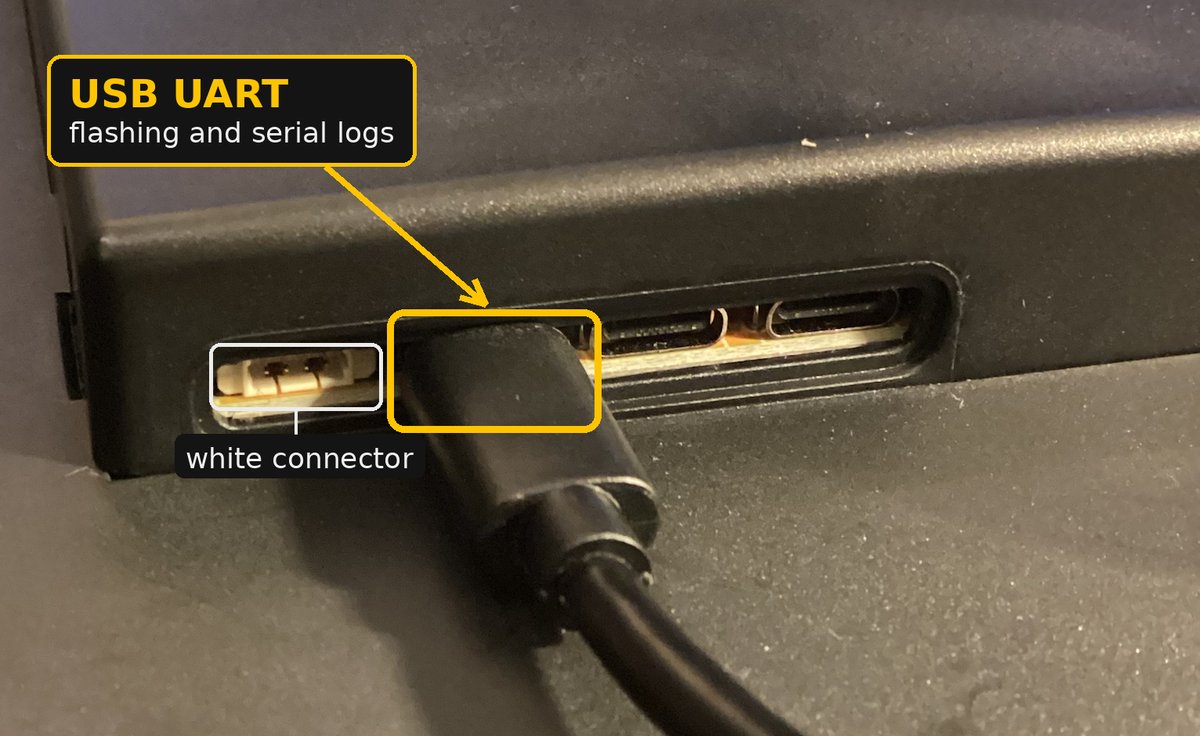
Use the USB-C port marked USB UART, the one right next to the small white connector. The other two also power the board, but the flasher cannot connect through them.
Colour bands instead of the interface? Guition ships this
board with two different LCD panels. Units from batch 2624 onward — the
figure in parentheses after the SKU on the back sticker — need
panel_rev=v2 in the [ui] section of
config.ini. WiFi network listed but never
connected? Copy c6_firmware.bin from
SD_card_content/Guition/ to the root of the card: the display
updates its WiFi coprocessor from it at boot. Both are explained in
configuration.md.
Recent units carry a newer revision of the ESP32-P4 that needs its own build: on them the standard build restarts in a loop right after flashing. This page cannot flash the v3 chip yet, but Espressif's own browser tool can:
0x0, choose the file you downloaded and click
Program. When it finishes, unplug the board and plug
it back in.With Python, esptool does the same:
esptool --chip esp32p4 write-flash 0x0 mister_monitor_guition10inch_v3.bin
These units also need panel_rev=v2. More in
installation.md.
These official binaries are for personal use: they embed the project's private ScreenScraper credentials and may not be resold pre-flashed on hardware. Commercial builds must be compiled from source with your own credentials. Source code is free software — GPL-3.0 (firmware) and AGPL-3.0 (server); see LICENSE and TRADEMARK.md. To learn which boards are in use, this page counts visits, flashes and firmware downloads per board with GoatCounter, anonymously and without cookies.